tap a picture to see it big · tap DONE as you go - this device remembers
Step 1 of 13
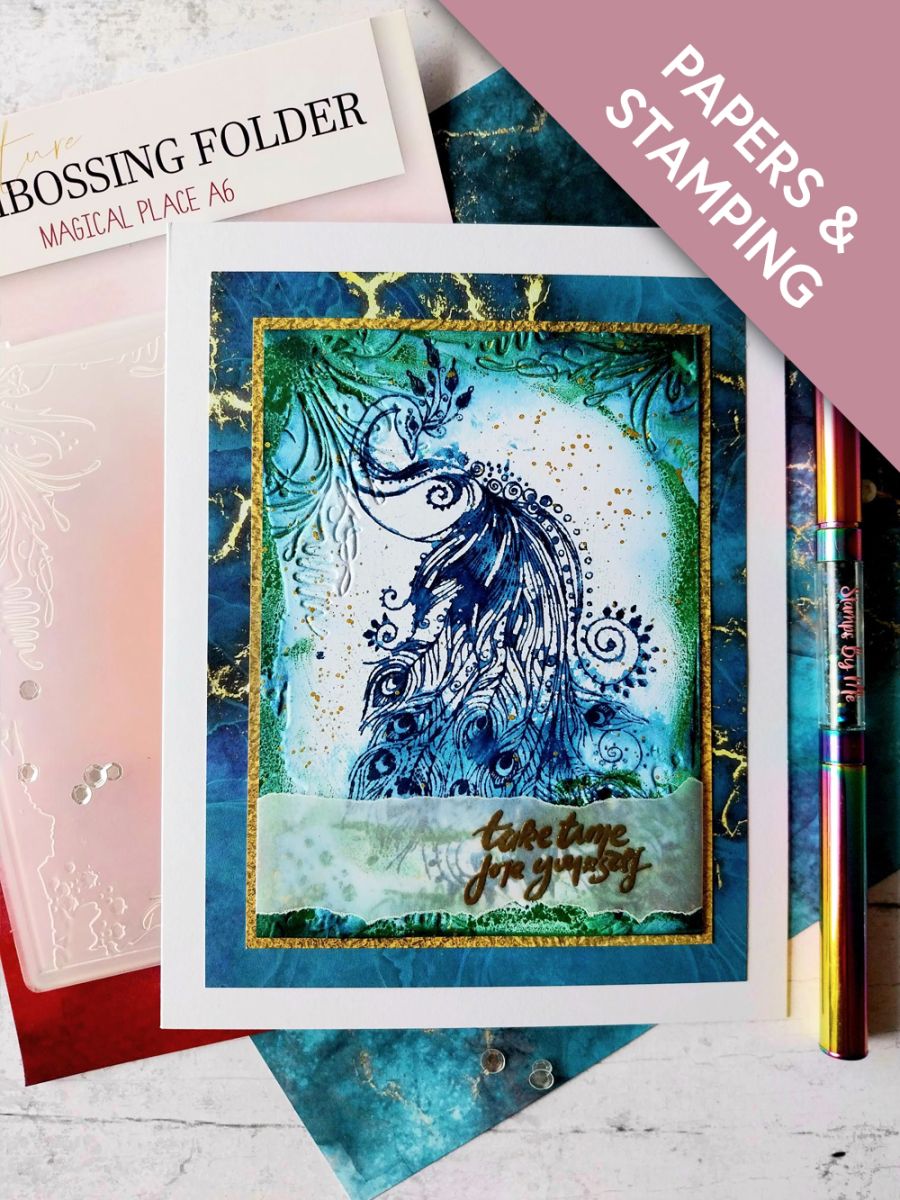
Cut a piece of white card 5 1/4 x 3 3/4".
Stamp the beautiful Peacock in Tiffany (DO NOT move the stamp or card at this stage), lightly spray the stamped image and allow the ink to "bleed". Mop up any excess water, then blast dry with your heat tool. How much you allow the ink to bleed, is your choice!
Step 2 of 13
Re-ink and stamp back over your image, re-defining the detail. Dry with your heat tool.
Step 3 of 13
Using your Hedgerow ink pad, ink around the DEBOSSED edges of the Magical Place embossing folder.
Step 4 of 13
Place your stamped card inside the inked folder and run it through your machine. Dry with your heat gun.
Step 5 of 13
Use your blending brush to add Tiffany around the edges, making the embossed areas of the frame "pop".
Step 6 of 13
Spritz a little water on to your Goldmine paint and splatter over your artwork with a paint brush. You can add as few or as many splats as you want....I like a lot!! Dry with heat tool then set to one side.
Step 7 of 13
Tear a panel of vellum 4 1/4" in length and wide enough for your sentiment to fit.
Wipe over with an anti-static bag. Stamp the sentiment, from I Can And I Will, in the WOW sticky embossing ink, to the right of the vellum panel. Apply the Gold embossing powder over the sticky ink, shake off the excess powder, then heat set with your heat tool. Ensure the heat gun is hot before you take it to the vellum, thus reducing the warping of your vellum.
Step 8 of 13
Place your embossed vellum across the bottom of your artwork, tuck the edges over and secure on the reverse of the card with double-sided tape.
Step 9 of 13
Trim this gorgeous gold paper, from the Magical Elegance Foundation Pack, to 5 1/2 x 4".
Step 10 of 13
Adhere your artwork on to the gold paper.
Step 11 of 13
Cut this stunning blue/gold marble paper, from the same pack, to 6 1/4 x 4 3/4".
Step 12 of 13
Adhere your artwork on to this.
Step 13 of 13
Adhere to the front of your 7 x 5 1/2" white card blank, to complete your card.
You made it!
Share your make with the Stamps By Me community - and keep this guide for next time.
Hello! I'm Toni's AI craft helper - I know the projects from Toni's shows, our guides and everything in the shop. Ask me anything, like "which dies go with this stamp set?" or "what do I need to start ink blending?"
An AI helper (not Toni herself), answering from Toni's shows and our shop - please check the product page before you buy.