
QUICK LINKS

info@howtocraftnetwork.com
We just got smarter - shop and watch with the SBM appGET THE APPWatch us live on your smart TVSEE HOWDiscover our dedicated IPTV channel - go to my-telly.comWATCHCollect loyalty points on every orderFIND OUT MORE
Welcome to the How to Craft Network
 
SBM SHOP
FOLLOW US
GIVE YOUR FRIENDS $10 OFF REFER A FRIEND › DISCOVER MY-TELLY.COM › WE JUST GOT SMARTER GET THE APP › AWARD WINNING CHANNEL ON YOUR TV › JOIN THE CLUB FOR SAVINGS ›
 
Oh Gosh!
How to guide · 10 steps

Oh Gosh!

13 April 2022Die CuttingHeat EmbossingStamping Techniques
10steps
Step 1 of 10

Everything you need

0 of 17 ready
The list
From your craft stash
Tick what you have - this device remembers.

Step by step

tap a picture to see it big · tap DONE as you go - this device remembers
Step 1 of 10

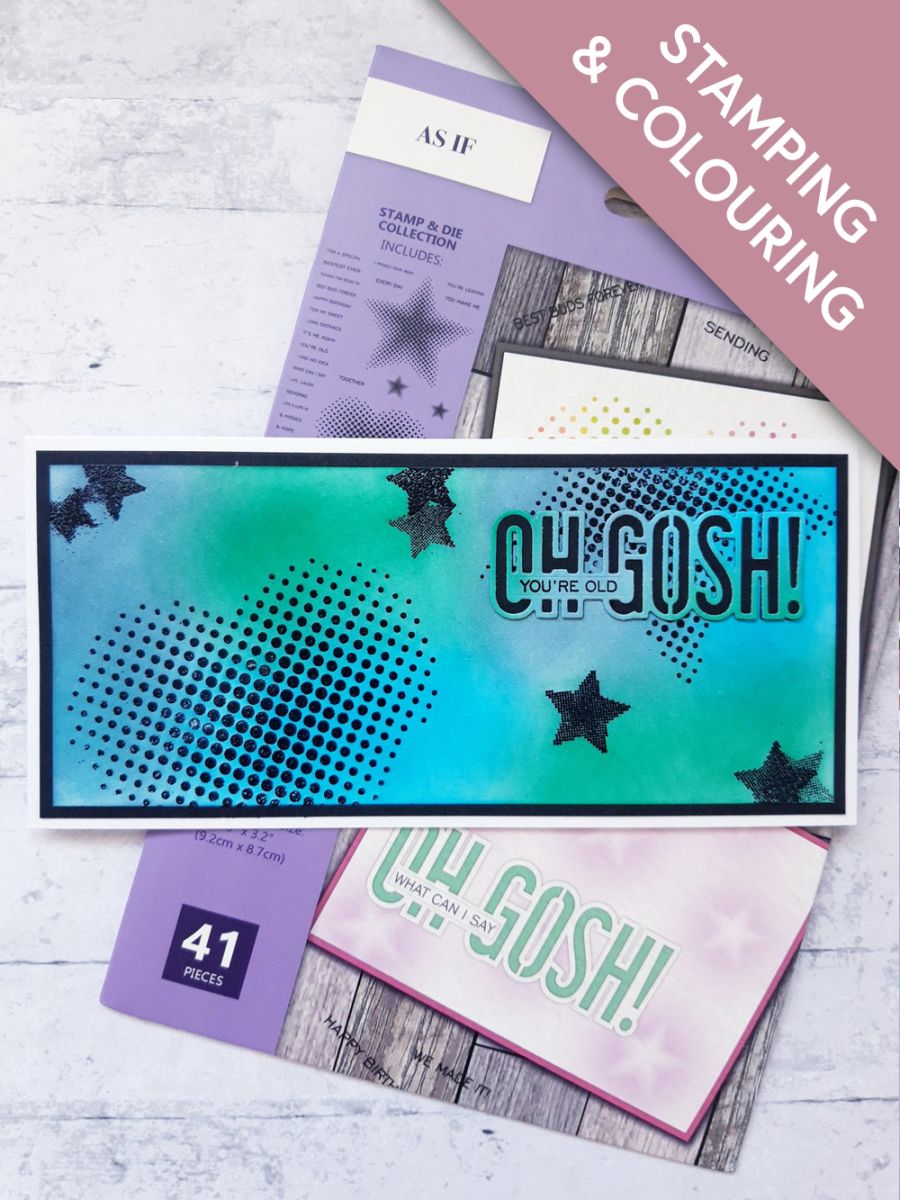
Wipe over the white card (7 1/2 x 3 1/4"), with the anti static bag. 

Ink up the heart stamp, from the As If Stamp and Die Collection, with the sticky ink pad, and stamp coming up from the bottom left of the card (laid in landscape view). 

Repeat with the large, and smaller star stamps, to create a random background. 

Apply the embossing powder over your stamped images.

Make sure your gun is nice and hot before heat setting the powder, ensuring you move it on as soon as the powder turns, to avoid warping the card. 
 

Step 2 of 10

Blend the Izink inks over your embossed images, using your blending brush or tool. 

Step 3 of 10

Once the ink is dry, mat this on to the black card (7 3/4 x 3 1/2"). 

Step 4 of 10

Adhere this on to your DL card blank, and set to one side. 

Step 5 of 10

Blend the same Izink inks on to the white card (4 x 2"). 

Step 6 of 10

Place the detailed Oh Gosh die, from the As If set, on to your dried, inked card, and run it through your die cutting machine. 

Step 7 of 10

Place the coordinating Oh Gosh die on to the black card (4 x 2"), and run it through your die cutting machine. 

Step 8 of 10

Adhere the inked, die cut sentiment, on to the solid black, die cut sentiment. 

Step 9 of 10

Ink up one of the coordinating stamps, from the same set, with the Onyx Black Versafine, and stamp on to the panel, on the front of the sentiment die. 

Step 10 of 10

To finish, adhere the die cut sentiment on to the top right, of your card. 

You made it!

Share your make with the Stamps By Me community - and keep this guide for next time.

⇩ DOWNLOAD THE PDF

More die cutting guides

all the guides ›

Prefer the previous layout? Open the old page.